Set and test a phone alarm for an ordinary morning
Choose a time, save an alarm, and test it before you need it. Use your own phone instructions when the buttons look different.
Why it matters: A small practice run helps you notice a wrong time or silent sound before a busy morning.
Written guidance reviewed: 2026-11-05 · Sources and equipment assumptions are below.
Take this guide to another device
Steps, notes, supplies, setup choices, results and check dates save on this browser as you work. Plus can also keep an account copy. Account copies update only when you choose Save; loading one replaces the browser draft shown here.
Review all saved work. Saved account check dates appear in My Day. Clear the date and save again to finish a follow-up. Email settings stay separate; existing opted-in agenda or deadline emails can include these dated actions.
Understand the job before starting
A small practice run helps you notice a wrong time or silent sound before a busy morning.
A common mistake to avoid
If the test is silent, do not keep adding more alarms. Check the selected sound and alarm volume, then use the maker help for your exact phone and software. A calendar alert is a separate feature. Do not assume an alarm follows you to another device or works when the phone is off. Test again after changing settings. This guide does not promise to wake every person.
Words used in this guide
Rent
The amount paid to use someone else’s property for an agreed time. Read the example
Backup
A recoverable copy of data made for loss or damage. Read the example
Use what you already have. Check each item when it is ready.
Before you begin
Practice with a low-stakes reminder. An ordinary phone alarm is not a safety alarm or a medical reminder system. Keep private schedule details out of shared worksheets. Do not change someone else’s alarms. Pictures are generic examples, not exact screens. If a test fails, use a trusted backup and get help with your exact device before relying on it.
0 of 4 steps checked0%
Guide progress and notes save on this browser; choose Save account copy above to carry them to another device with Plus. Downloads contain the complete blank checklist; print to include your current checks and notes.
Do it with me
Your step position saves on this browser. Use the picture when available, then check the written result.
STEP 1 OF 4
Choose a time before opening the alarm
Start here: Work backward from when you need to leave.
Illustration: Choose a time before opening the alarm. Read the steps for your exact task.
Read-aloud is available in supported browsers; the written steps always remain available.
An alarm is a signal at a chosen time.
First decide what it should tell you to do.
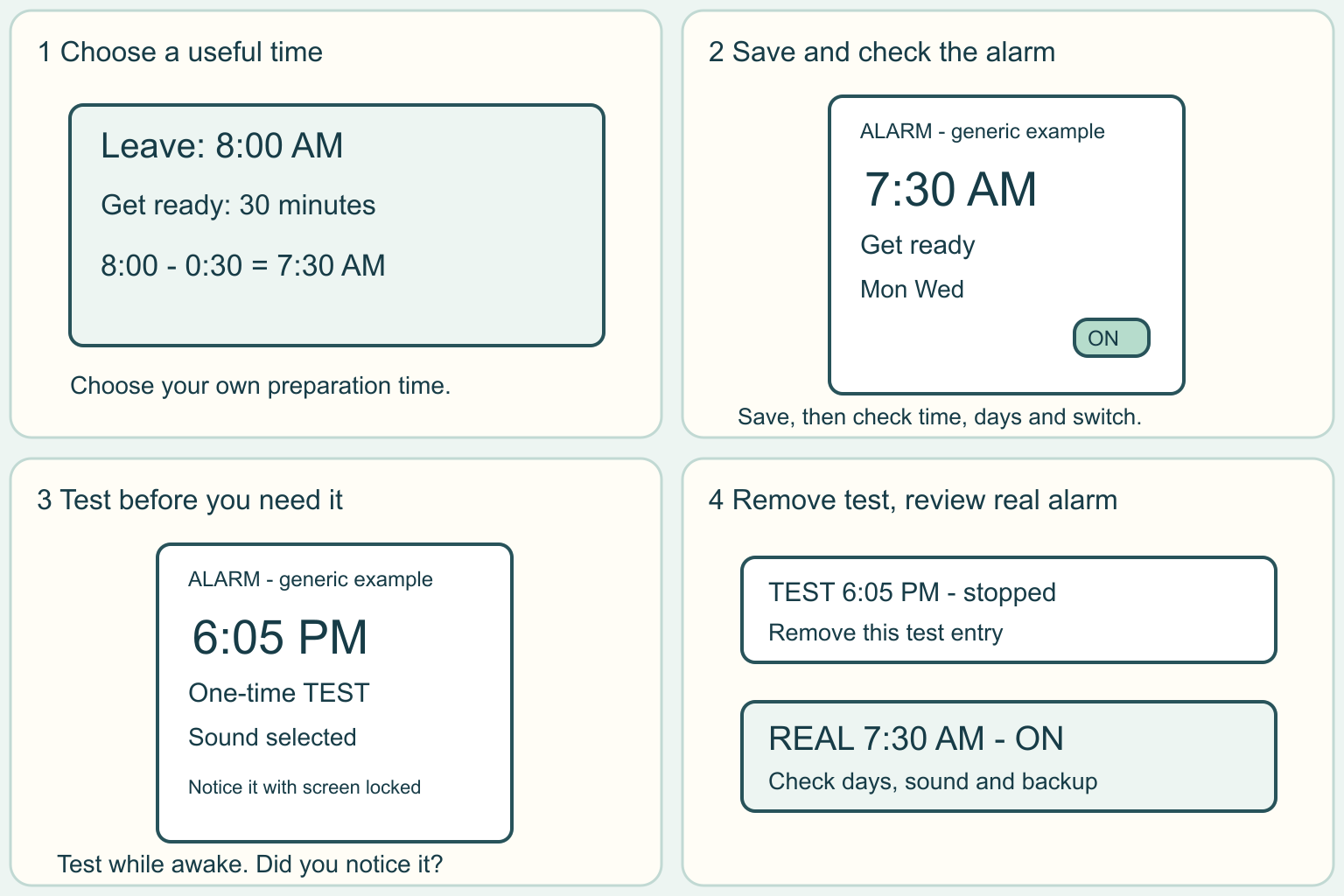
Write a simple plan: leave at 8:00 in the morning, allow 30 minutes to get ready, so start getting ready at 7:30.
These are practice times, not a rule for your morning.
Add the time you personally need.
AM means after midnight and before noon.
PM means noon through the evening.
In a 24-hour display, 07:30 is morning and 19:30 is evening.
Check the phone clock shows the correct local time, especially after travel or a clock change.
Before moving to the next step
Check this specific result: I chose a morning or evening time and know what I need to do when it rings.
If that result is not true yet, leave the box unchecked. Write what is missing in your notes; use the official instructions below when the equipment or situation differs.
STEP 1 OF 4
Choose a time before opening the alarm
Start here: Work backward from when you need to leave.
Illustration: Choose a time before opening the alarm. Read the steps for your exact task.
An alarm is a signal at a chosen time.
First decide what it should tell you to do.
Write a simple plan: leave at 8:00 in the morning, allow 30 minutes to get ready, so start getting ready at 7:30.
These are practice times, not a rule for your morning.
Add the time you personally need.
AM means after midnight and before noon.
PM means noon through the evening.
In a 24-hour display, 07:30 is morning and 19:30 is evening.
Check the phone clock shows the correct local time, especially after travel or a clock change.
Before moving to the next step
Check this specific result: I chose a morning or evening time and know what I need to do when it rings.
If that result is not true yet, leave the box unchecked. Write what is missing in your notes; use the official instructions below when the equipment or situation differs.
STEP 2 OF 4
Create the alarm and review the saved entry
Start here: Open Clock, choose Alarm, and add a new alarm.
Illustration: Create the alarm and review the saved entry. Read the steps for your exact task.
Look for the Clock app already on your phone.
In its Alarm section, use Add or the plus sign.
Choose the hour and minutes, then check AM or PM if shown.
Add a short name such as Get ready.
Choose only the repeat days you actually need.
Repeat means the alarm can ring again on the selected days.
Save with the button your app shows, such as Save or OK.
Return to the alarm list and check its time, days and on switch.
A saved alarm with its switch off will not give the reminder you intended.
Before moving to the next step
Check this specific result: The saved entry shows my intended time and days, and its switch is on.
If that result is not true yet, leave the box unchecked. Write what is missing in your notes; use the official instructions below when the equipment or situation differs.
STEP 3 OF 4
Test an alarm while you are awake
Start here: Make a separate one-time test a few minutes ahead.
Illustration: Test an alarm while you are awake. Read the steps for your exact task.
Choose a built-in alarm sound and a comfortable audible level.
Alarm volume can have a different control from video volume.
Follow your maker instructions rather than guessing from a volume button.
For practice, set a separate alarm five minutes ahead, with no other alarm nearby.
Put the phone where you normally plan to leave it and lock the screen.
Wait there and check whether you notice the signal.
Test with your usual quiet-mode settings too.
Google Clock can report blocked notifications, quiet-mode restrictions or battery-saving issues.
Galaxy settings can silence alarms when system sound is off.
Do not assume every phone behaves alike.
Before moving to the next step
Check this specific result: I noticed the test signal, or recorded the failure and chose a backup instead of trusting it.
If that result is not true yet, leave the box unchecked. Write what is missing in your notes; use the official instructions below when the equipment or situation differs.
STEP 4 OF 4
Stop the test and check tomorrow one more time
Start here: Remove the test, then review the real alarm.
Illustration: Stop the test and check tomorrow one more time. Read the steps for your exact task.
Stop or Dismiss ends the ringing.
Snooze delays it and can make it ring again; the delay depends on your settings.
Use Stop for this practice.
Turn off or delete only the test entry.
Reopen your intended morning alarm and check the time, repeat days, sound and on switch.
Keep the phone charged and follow its normal safe charging instructions.
If hearing a tone is not useful for you, ask about an accessible alert you can reliably notice and test that arrangement.
A separate alarm clock or agreed check-in can be a backup for an important morning.
Check the plan again when your schedule changes.
Before moving to the next step
Check this specific result: The test is removed, my real alarm is still on, and I know how to stop it and use my backup.
If that result is not true yet, leave the box unchecked. Write what is missing in your notes; use the official instructions below when the equipment or situation differs.
Pictures for this guide
Picture 1 of 4 · Choose a time before opening the alarm
A timeline subtracts thirty minutes from eight in the morning to choose seven thirty.
For: Choose a time before opening the alarm
Illustrations show examples of the actions above. Follow your equipment’s instructions.
Notes about these pictures
An alarm is a signal at a chosen time. First decide what it should tell you to do. Write a simple plan: leave at 8:00 in the morning, allow 30 minutes to get ready, so start getting ready at 7:30. These are practice times, not a rule for your morning. Add the time you personally need. AM means after midnight and before noon. PM means noon through the evening. In a 24-hour display, 07:30 is morning and 19:30 is evening. Check the phone clock shows the correct local time, especially after travel or a clock change.
Practice with a low-stakes reminder. An ordinary phone alarm is not a safety alarm or a medical reminder system. Keep private schedule details out of shared worksheets. Do not change someone else’s alarms. Pictures are generic examples, not exact screens. If a test fails, use a trusted backup and get help with your exact device before relying on it.
Was this step clear?
Flag “Choose a time before opening the alarm” for review. We save the guide and step identifiers with your account to limit duplicates, not your private notes.
A specific companion has not been selected for this new guide yet. You can search for related demonstrations; search results have not been reviewed by Life’s Checklists.
These YouTube videos belong to their respective creators. Life’s Checklists does not own them and is not affiliated with the creators. Links open on YouTube, where the videos are available independently of our membership.
How to use the video with this guide
Read “Before you begin” first. Watch the relevant part, pause, then return to the written step and its completion check. Use captions and playback speed if they help. A demonstration may cover only part of the task or show different equipment.
Your model’s instructions and current official guidance take priority. For urgent problems, follow the stop instructions without waiting to watch a video.
Finish the job and know what to do next.
For this guide, the final result is: The test is removed, my real alarm is still on, and I know how to stop it and use my backup.
A concrete way to approach this task
Fictional plan: Jordan leaves at 8:00 AM. Getting ready takes 30 minutes, so the alarm is 7:30 AM. Jordan first tests at 6:05 PM while awake, stops that test, deletes it, and rechecks the 7:30 AM entry. No real alarm is created by this website.
What if I cannot complete a step?
If the test is silent, do not keep adding more alarms. Check the selected sound and alarm volume, then use the maker help for your exact phone and software. A calendar alert is a separate feature. Do not assume an alarm follows you to another device or works when the phone is off. Test again after changing settings. This guide does not promise to wake every person.
Identify the exact step: “Choose a time before opening the alarm.” Record what you tried, what happened, and which item or model you used. Ask for help with that specific problem rather than repeating an unsafe or unsuccessful action.
Practice with a low-stakes reminder. An ordinary phone alarm is not a safety alarm or a medical reminder system. Keep private schedule details out of shared worksheets. Do not change someone else’s alarms. Pictures are generic examples, not exact screens. If a test fails, use a trusted backup and get help with your exact device before relying on it.
Connect this skill to everyday life
Use your school’s official calendar to collect one deadline and its required action. Separate application, registration, payment, housing, and financial-aid dates.
Admission is not course registration, and an aid estimate is not money already received. Each office may need different documents.
A useful record for this task: Record the result of “Stop the test and check tomorrow one more time”: The test is removed, my real alarm is still on, and I know how to stop it and use my backup.
When finished, record the result and any next check or follow-up date. Your original step checks and notes remain on this browser.
Keep the result of your work
Finish and check every step before recording completion. You can write a draft below now.
Result: Not recorded · Next check: Not chosen
Choose a date from your own manual or situation. No email is enabled by saving this record.